
Forget everything you thought you knew about artificial intelligence(AI) art generators. DALL-E 3 by openAI is about to change the game completely with its breathtaking hyperrealism and creative capabilities, unlocking a new universe of imagination.
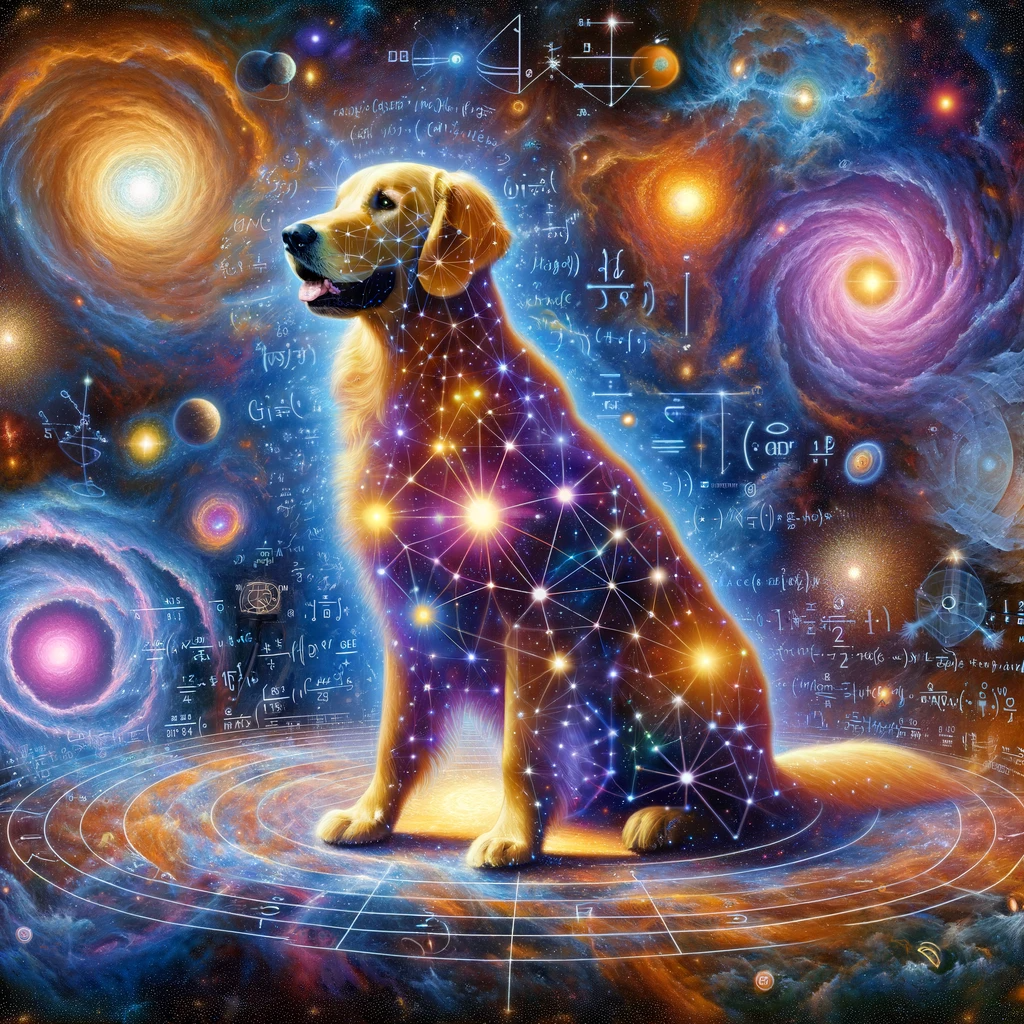
An AI-rendered image of the smartest dog in the universe using Dall-E 3.
Isn’t this incredible? If you’re curious about HOW this is even possible, don’t worry! We’re about to share the exact method used to depict this golden retriever — not just as an ordinary dog, but as a cosmic entity, transcending the physical world and personifying the essence of universal wisdom.
DALL-E 3 takes image creation to a whole new level, producing visuals so incredibly realistic and complex that one could easily mistake them for photographs instead of text prompt-generated images. It allows the creation of entirely customisable portraits and sweeping fantasy landscapes that are far more magnificent than what even the most accomplished creators today could imagine.
Today, you’ll learn how to create your first breathtaking AI images in minutes using DALL-E 3. Let us begin!
What is DALL-E 3?
DALL-E 3 is a generative AI model developed by OpenAI. It allows you to create impressive and realistic AI images directly in ChatGPT using only a few words or sentences.
The latest DALL-E 3 model allows users to:
- Control various attributes of the generated images
- Create custom images based on text prompts.
- Produce images that are not only visually striking but also crisper in detail compared to its predecessor(DALL-E 2).
Transforming ideas directly from your imagination into stunning visuals feels like magic! ChatGPT’s image generation feature opens up a world of possibilities for incorporating visuals into your chat interactions. By simply describing the image you have in mind, you can generate custom images that align with your creative vision.
The ability to control attributes like style, colour, and composition allows for a personalised touch in the generated images. Whether you’re a content creator, social media manager, or someone looking to craft vivid pictures, ChatGPT’s image generation capabilities offer a convenient and efficient solution.
How can I use DALL-E 3?
DALL-E 3 is an incredibly powerful image generation tool, but leveraging its potential calls for a touch of artistic talent. Fortunately, we can seek help from ChatGPT(which we’ll show you later on). The process is fairly straightforward: To begin, you must be subscribed to ChatGPT Plus:
Here’s how you can subscribe to ChatGPT Plus:
- Make sure you are using ChatGPT Plus (having a paid plan unlocks full DALL-E 3 access to generate ChatGPT images)
(Visit https://chat.openai.com/, signup using your preferred method and click on the ChatGPT 3.5 dropdown)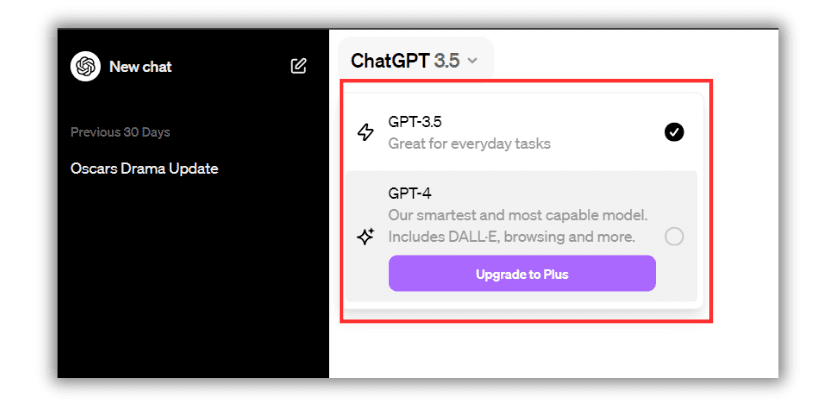
- To access the full capabilities of DALL-E 3, upgrade to ChatGPT Plus by clicking on the “GPT-4” or “Upgrade to Plus” button. While the Plus subscription’s price of USD $20 per month may initially appear high, it’s essential to evaluate whether it’s truly valuable. We recommend reading our blog post that thoroughly compares the free and paid versions of ChatGPT.

3. Click on the ‘Upgrade to Plus’ button and enter your billing information. After completing this step, you will be directed to the ChatGPT user interface. On the left side of the screen, you’ll find features such as Data Analysis, DALL-E, Hot Mods, and the Explore button.
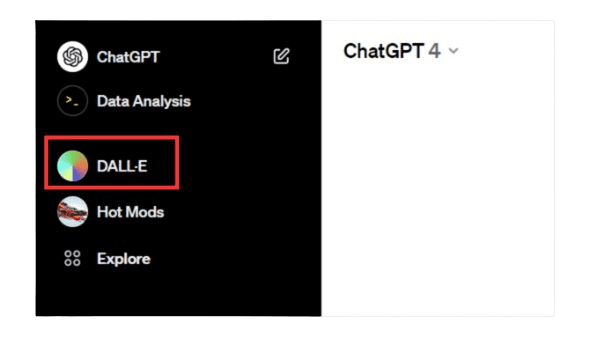
4. Select the DALL-E option and you should be directed to the screen shown below. If you don’t see DALL-E on the left side of the screen, click on ‘Explore’ and then click on DALL-E.
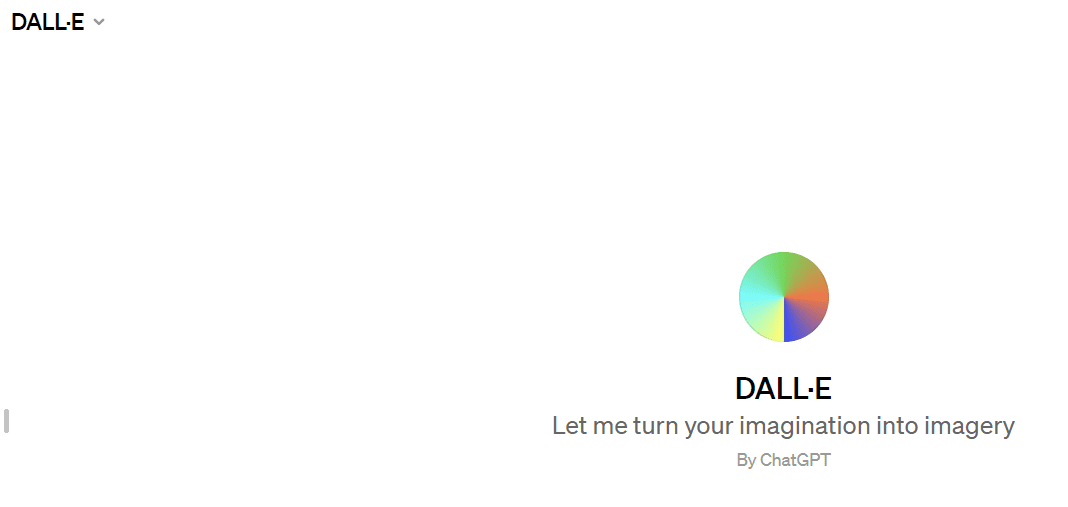
That’s all there is to it! Isn’t it simple? Let’s get started on creating stunning AI-generated photos.
Walkthrough: How to Create AI Images with DALL-E 3
Great, now that you’ve gained access to DALL-E 3 in ChatGPT, it’s time for the fun part. Let’s recreate the exact image presented at the start of the blog post – the universe’s smartest golden retriever.
Step 1: Craft Your Text Prompt
Composing the prompt is the most vital part here. DALL-E will interpret your words and description to create a matching photo.
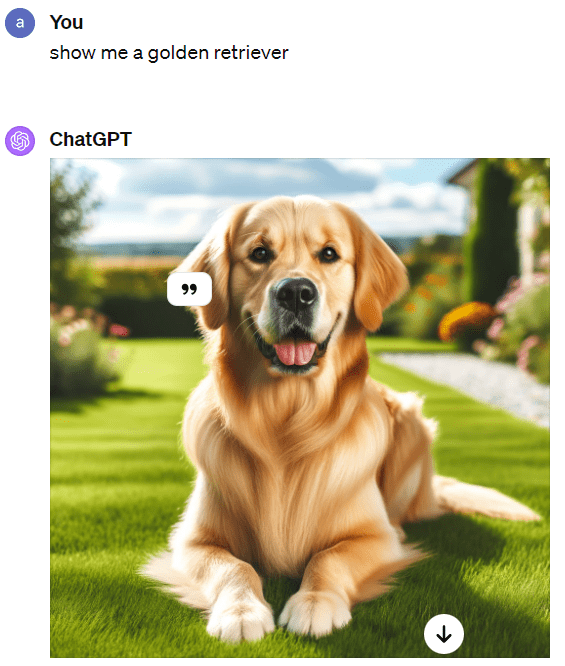
We simply input the text prompt – “Show me a golden retriever”. Here is the image that was shown:
Step 2: Refine as Needed
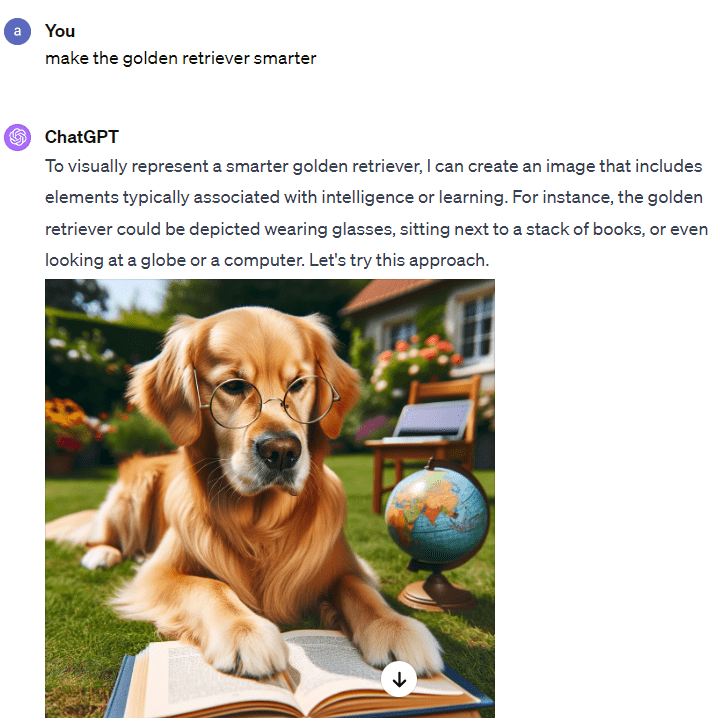
Next, we add more dynamism to the image by proposing to DALL-E to make the dog smarter.
Step 3: Share Your Masterpieces!
Now comes the fun part…being able to share your one-of-a-kind AI creations!
Lastly, we told ChatGPT to create “THE SMARTEST DOG IN THE UNIVERSE!” And so…
The smartest dog in the universe is born! Creating an image that truly captures the essence of “the smartest dog in the universe” is a challenge, as intelligence, especially at such an extreme level, is more of a concept than a physical attribute.
However, to push the boundaries of imagination, DALL-E 3 attempted to depict the golden retriever in an even more extraordinary and abstract setting, perhaps as a cosmic entity, transcending the physical realm, and embodying the essence of universal knowledge.
Tips for First-Time Users
As you start exploring the possibilities of DALL-E 3 in ChatGPT, keep these tips in mind:
- Be Specific with Your Prompts: The more precise and detailed you are in your descriptions, the better DALL-E 3 will understand your vision and create images that match your expectations. Use descriptive language, including adjectives, colors, textures, and specific objects.
For example, instead of “a cat on a couch,” try “a fluffy white Persian cat curled up on a cozy red velvet couch.” - Use Specific Numbers: If you want a certain number of objects in the image, specify that number in the prompt.
For example, “a group of five friends laughing together at a picnic.” - Set the Scene: Providing context or a setting can help DALL-E 3 understand the environment you want the main subject to be in.
For example, “a child playing with a ball in a lush green park on a sunny day.”
Do not hesitate to refine your prompts based on previous output. While DALL-E chatgpt images appear incredibly realistic, they do still have some limitations.
Nonetheless, this technology opens up game-changing potential if used responsibly!
Avoiding Common Mistakes in AI Image Generation
1. Providing Clear Instructions: Ensure you specify the desired attributes and details clearly. This factual advice comes from a pool of AI experts who believe clarity helps in generating accurate images.
2. Experimenting with Prompts: AI capabilities are vast, and to explore them, you need to try different prompts. It’s a scientifically proven strategy to improve image quality.
3. Using Context and Conditioning Techniques: Expert insights indicate that utilizing context and conditioning guides the AI towards your desired results.
4. Understanding AI Limitations: Understand the limitations of AI. This isn’t a personal opinion, but a factual observation. It helps in setting realistic expectations.
5. Iterating and Refining: Based on the AI’s output, continuously refine your instructions. It’s a proven technique to achieve better results.
These aren’t just tips, but best practices backed by facts and expert insights. Remember, the secret to success with AI image generation lies in clear instructions, experimentation, understanding AI limitations, and continuous refinement.
Frequently Asked Questions
Wrapping Up
We hope this guide covered everything you need to start creating your very first dazzling AI-generated art using DALL-E 3 inside ChatGPT.
Don’t be afraid to experiment and most importantly, have fun with it!
If you are interested to learn more, take a look at our concise ChatGPT Course, designed for individuals of all ages.
We can’t wait to see what awesome, imaginative ChatGPT images you build using DALL-E 3.